
Last updated October 20, 2026 · R36 Ultra Editorial Team
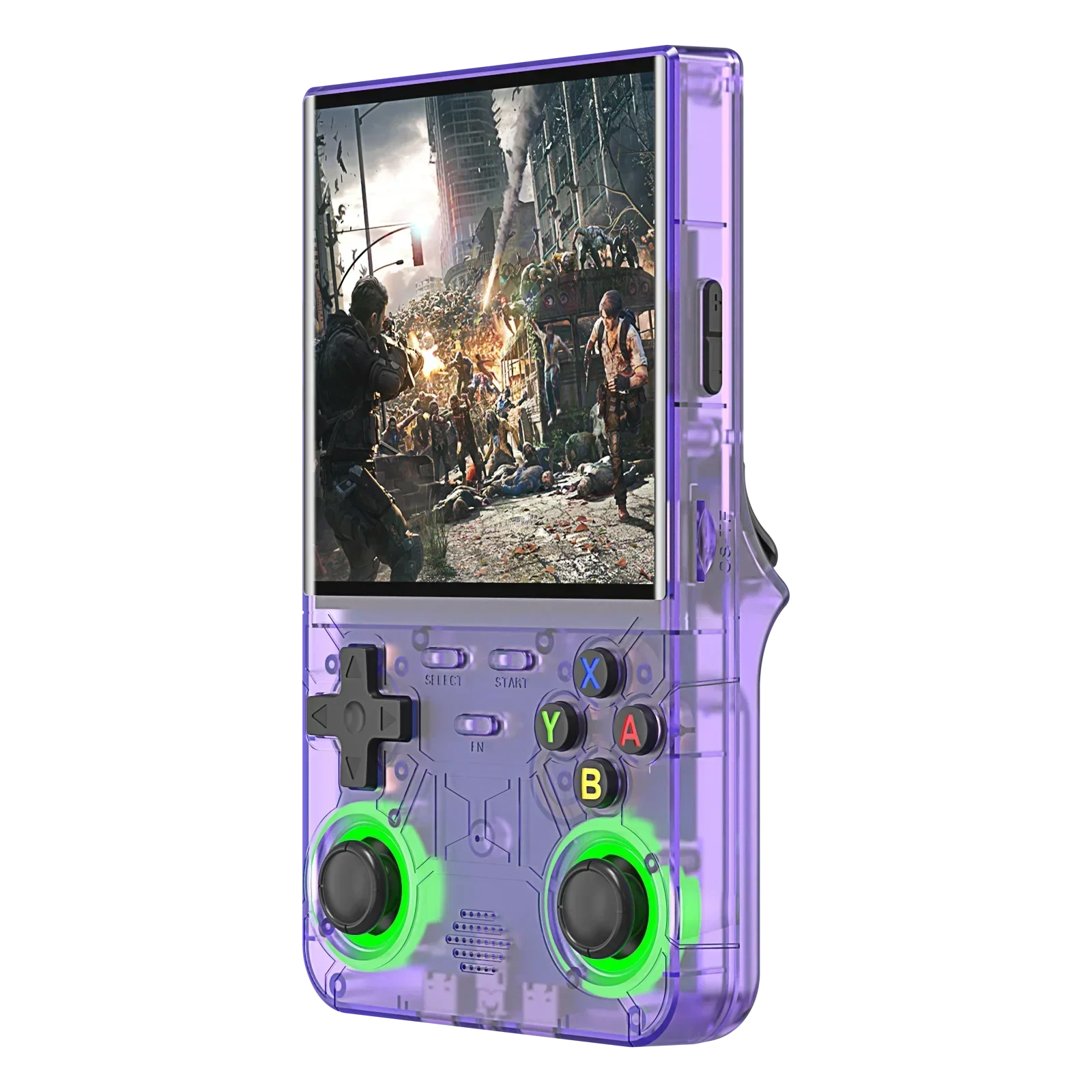
Yes, you can install an ArkOS-family firmware on the R36 Ultra, but not the original ArkOS. As of October 2026, the documented route is ArkOS4Clone (and its sibling dArkOS4Clone) by developer lcdyk0517. Its wiki lists the R36 Ultra as a supported device with its own 720×720 configuration. The dArkOSRE-R36 project describes R36 Ultra support as “working in the latest Beta”, and ROCKNIX covers the device only through its experimental “EE clone” image.
The safe way to try any of them is to flash a second microSD card and leave the stock system alone. This guide sets out what each project documents, which DTB (device tree file) the R36 Ultra uses, the known caveats and the install steps as the developers publish them.
As an Amazon Associate we earn from qualifying purchases.
Quick answer
- Original ArkOS has no R36 Ultra image. The christianhaitian/arkos repository is archived on GitHub. Official dArkOS doesn’t cover the device either: its v08272026 release ships images for the RG351MP, G350, A10 Mini and others, but not the R36 Ultra.
- ArkOS4Clone is the documented option. Its wiki lists “R36Ultra” under the UDT brand, with a 720P boot logo and its own config folder. The latest release, 20261008, came out on October 8, 2026.
- The R36 Ultra’s custom DTB is
rk3326-r36ultra-linux.dtb. ArkOS4Clone’s R36 Ultra boot.ini loads this file. You pick it with the project’s DTB selector rather than renaming files. - dArkOSRE-R36 support is still in beta. The project lists board “GR36S-MB V1.4-2025-07-30” as the R36 Ultra and notes there is no joystick LED support.
- The R36 Ultra X is a different device. ArkOS4Clone gives it a separate “R36UltraX” config with a 768P logo. Don’t mix the two.
- The stock system lives on internal flash. According to Retro Handhelds and a Linux write-up by sim1222, the R36 Ultra runs EmuELEC from built-in storage, so flashing a separate microSD card doesn’t overwrite it.
-
4-inch Handhelds, Handheld Game Console
Amazon price: $69.99 as of Oct 27 · updated daily
Check Price → -

Compact Handhelds, Handheld Game Console
Amazon price: $32.89 as of Oct 27 · updated daily
Check Price →
Which custom firmware supports the R36 Ultra in 2026?
The table lists what each project or wiki actually documents for the R36 Ultra (4.0-inch 720×720, RK3326). “Listed” means the project names the device. It doesn’t mean every unit or batch will work.
| Firmware | R36 Ultra status | Source | Notes |
|---|---|---|---|
| ArkOS4Clone | Listed as supported | arkos4clone wiki and GitHub releases | Config folder consoles/r36ultra/, 720P logo. Based on ArkOS R3XS. Latest release 20261008. |
| dArkOS4Clone | Shipped in the same releases | arkos4clone 20261008 release; Installation wiki | Built on a dArkOS base. The wiki says its build process “still requires more testing”. |
| dArkOSRE-R36 | Beta | southoz/dArkOSRE-R36 README and Beta Testing wiki | Board GR36S-MB V1.4-2025-07-30. Support added in the 04262026 beta, with no joystick LED support. Not in the latest GitHub release (03082026). |
| ROCKNIX | Experimental (EE clone family) | ROCKNIX EE clones page; handhelds.wiki R36 Ultra page | Uses the RK3326 “B” image. The ROCKNIX page lists 720×720 panels but doesn’t name the R36 Ultra. The display may need a DTBO overlay generated from your stock DTB. |
| UnofficialOS | Listed by handhelds.wiki | handhelds.wiki R36 Ultra page | The wiki says to use the “v2 dtb”. Not confirmed on the UnofficialOS side for this model. |
| ArkOS (XiFan mod) | Community mod, no maintained repo | handhelds.wiki; Vi-K36/EE-Clones-DTB | Download hosted on Google Drive. A separate rf3640g4ka.dtb is shared as a “black screen fix”. |
| Original ArkOS | Not supported | christianhaitian/arkos (archived) | No R36 Ultra image |
| Official dArkOS | Not supported | christianhaitian/dArkOS v08272026 release | No R36 Ultra image in the release files |
R36 Ultra custom firmware support as documented by each source, checked October 20, 2026.
If you have an R36S rather than an R36 Ultra, the picture is different. Our R36S custom firmware guide and dArkOS guide cover those images. Not sure which model you have? Check the R36 Ultra specs and our original vs clone checks.
Is the R36 Ultra an R36S clone, and why does that matter?
For firmware purposes, yes. dArkOSRE-R36 files the R36 Ultra under “clone”, not under genuine R36S boards. The handhelds.wiki page points R36 Ultra owners to its “EmuELEC clone” category.
This matters because images built for the genuine R36S assume a different screen (640×480), different controls and a different board. A wrong DTB usually means a black screen or broken controls, which is why every project here asks you to pick your exact device.
Watch the name, too. ArkOS4Clone treats the R36 Ultra X as a separate device, with its own files and a 768P boot logo, so its DTB is not interchangeable with the R36 Ultra’s. Our R36 Ultra X vs R36 Ultra comparison explains how to tell them apart.
Which DTB does the R36 Ultra use?
There are two DTBs to know: the stock one and the custom-firmware one.
- Stock:
rk3326-evb-lp3-v12-linux.dtb. The Vi-K36/EE-Clones-DTB repository keeps two stock versions under this name (“Stock” and “Stock V2”), and sim1222 found the same file on the device’s internal EMUELEC partition. - ArkOS4Clone:
rk3326-r36ultra-linux.dtb. The project’s R36 Ultra boot.ini loads it and caps the CPU at 1296 MHz and the GPU at 520 MHz.
Two rules from the ArkOS4Clone wiki: don’t rename DTB files, because its device detection reads boot.ini and may fall back to R36S settings. If you’re unsure which device you have, the release notes suggest uploading your original EmuELEC DTB to the project’s DTB Identification Tool for automatic detection.
ArkOS4Clone release notes also mention an “R36Ultra V2”. The wiki’s device table lists a single R36Ultra entry, and we found no published way to tell V1 from V2 by looking at the unit. The DTB tool is the safest check.
What should you back up before flashing?
Do this before you download anything.
- Keep the stock card safe. Copy its contents to your computer, or make a full image of it. Our SD card guide walks through the backup.
- Save the stock DTB. dArkOSRE-R36 asks owners of unlisted boards to send their original .dtb files and boot.ini, and ROCKNIX tells users to keep the stock directory because it may be needed later. A copy costs nothing.
- Leave the internal storage alone. sim1222 dumped the R36 Ultra’s internal flash and got a 7.28 GiB image containing the EMUELEC system, while Retro Handhelds lists 2GB of eMMC plus a microSD slot. The sources disagree on capacity, but both say the stock OS is built in.
- Use a second card for custom firmware. Flash the new system onto a separate, good-quality card such as a SanDisk 128GB microSD card. ArkOS4Clone’s October releases fixed first boots that froze while extracting files on some cards, and the developer still recommends replacing low-quality cards.
How do I install ArkOS4Clone on the R36 Ultra?
These steps follow the ArkOS4Clone wiki and release notes (20260305 to 20261008). Check the current release page before you start, because file names change with each version.
- Download every part of the release. Images come split into numbered parts, for example
ArkOS4Clone-20261008.img.xz.7z.001to.003. Put all of them in one folder. - Extract the parts together to get a single
.xzimage. - Flash the image to your second card. The release notes name Rufus for this.
- Select your device. Open the card’s BOOT partition on a Windows PC, run
dtb_selector_win32.exeand choose R36Ultra. A search box was added in 20260905. Pick a battery driver (Original or arkos4clone_fix) when prompted. - On Mac or Linux, copy the files by hand. From
consoles/r36ultra/, copyboot.iniand the .dtb files to the root of BOOT. Add the kernelImagefor your chosen battery driver and the 720Plogo.bmp. - Insert the card and power on. The ArkOS4Clone wiki says to connect the charger before powering on. If you get a black screen with no backlight, the 20260905 notes say to charge for 15 minutes, then power on with the charger connected.
- Update online afterwards. From 20261008, updates can be installed online from inside EmulationStation.
For dArkOS4Clone, the steps are the same, using the dArkOS4Clone files from the same release. Once you’re in, our guide to adding games you legally own covers loading your library.
What about the dArkOSRE-R36 beta?
dArkOSRE-R36 has its own process. You run a “SELECT MODEL” tool on the BOOT partition, remove any second SD card until setup finishes, and keep the charger unplugged during first boot. ROCKNIX also says to boot with the charger unplugged.
That charger advice is the opposite of ArkOS4Clone’s, so follow the instructions for the image you’re flashing. Don’t mix steps between projects. Remember that the R36 Ultra build of dArkOSRE is a beta linked from the project’s Beta Testing wiki page, not a regular release.
What are the known R36 Ultra caveats?
The 720×720 square screen
Most ArkOS-family themes and tools were designed for 640×480. The dArkOSRE beta notes say its default theme still lacks some 720×720 changes, and they mention rescaling Advanced Drastic’s views for 720×720. The ArkOS4Clone developer has asked for help with themes that support 1:1 screens.
PortMaster’s device list includes a 720×720, 1:1 handheld (the Powkiddy RGB30) but has no R36 Ultra entry. Whether a given port scales well on the R36 Ultra is not confirmed.
Wi-Fi
ArkOS4Clone’s 20260305 release lists the R36 Ultra among devices with built-in RK915 Wi-Fi. It fixed sleep and wake problems and a MAC address that changed on every reboot. sim1222 also loaded the rk915 driver on the device, and ROCKNIX describes the chip as 2.4 GHz. Our Wi-Fi and PortMaster guide covers setup once you’re connected.
Sticks, buttons and RGB rings
ArkOS4Clone 20260815 moved the R36 Ultra’s RetroArch menu hotkey to FN + X and added joystick drift calibration to EmulationStation. Axis remapping is done in the project’s DTB Customization Tool, which only accepts ArkOS4Clone DTBs.
Joystick RGB LED control arrived for the “R36Ultra V2” in 20260309, and 20260617 fixed the LEDs not coming back after sleep. dArkOSRE’s beta has no joystick LED support.
Writing to internal eMMC
ArkOS4Clone 20261008 added an option to write dArkOS4Clone to eMMC, while its Installation wiki still lists eMMC installation as unsupported. ROCKNIX warns that flashing eMMC can brick a device, and recovery may mean opening the case and shorting pads on the board. Stay on the SD card.
How do I go back to the stock firmware?
Power off, remove the custom-firmware card and put your original card back. Because the stock system sits on internal flash, according to sim1222 and Retro Handhelds, a separate custom card shouldn’t change it. If the stock system doesn’t come back, see our troubleshooting guide before reflashing anything.
Should you install custom firmware on the R36 Ultra at all?
You don’t have to. The stock system plays games as it ships, and our R36 Ultra firmware guide explains how to keep it healthy. Custom firmware is worth it if you want newer emulators, online updates or PortMaster, and you’re willing to deal with beta-quality support on a square screen.
Performance won’t change much either way, because the RK3326 chip sets the limit. Our emulation guide covers what runs well. If tinkering is the main appeal, the R36S has the most mature firmware support in the family.
Sources
- ArkOS4Clone wiki: supported devices (lcdyk0517)
- ArkOS4Clone Installation guide
- ArkOS4Clone releases (20260305 to 20261008 notes)
- ArkOS4Clone R36 Ultra boot.ini
- ArkOS4Clone DTB Identification Tool
- dArkOSRE-R36 README (southoz)
- dArkOSRE-R36 Beta Testing notes
- dArkOSRE-R36 Firmware Installation
- dArkOS releases (christianhaitian)
- ArkOS repository (archived)
- ROCKNIX Wiki: K36 and other EE clones
- Handhelds Wiki: R36 Ultra
- Vi-K36/EE-Clones-DTB repository
- sim1222: Installing Linux on the R36 Ultra (Japanese)
- Retro Handhelds: R36 Ultra review
- PortMaster supported devices
- Notebookcheck: R36 Ultra announcement
Frequently asked questions
Does ArkOS work on the R36 Ultra?
The original ArkOS does not: its repository is archived and it never had an R36 Ultra image. ArkOS4Clone, a community port based on ArkOS, lists the R36 Ultra as a supported device, and its latest release is 20261008.
Which DTB do I select for the R36 Ultra?
In ArkOS4Clone’s DTB selector, choose R36Ultra, which uses rk3326-r36ultra-linux.dtb. Don’t choose R36UltraX, which is a different device. If you’re unsure, upload your stock rk3326-evb-lp3-v12-linux.dtb to the project’s DTB Identification Tool.
Is there a dArkOS image for the R36 Ultra?
Not from the official dArkOS project. The dArkOSRE-R36 fork lists the R36 Ultra as beta, without joystick LED support, and ArkOS4Clone releases include a dArkOS4Clone image. Our dArkOS guide covers the R36S side.
Does ROCKNIX support the R36 Ultra?
Only experimentally. ROCKNIX’s EE clone page covers 720×720 RK3326 clones with its B image, and handhelds.wiki points R36 Ultra owners there, but the ROCKNIX page doesn’t name the R36 Ultra. The display may need an overlay generated from your stock DTB.
Does Wi-Fi work on the R36 Ultra with custom firmware?
ArkOS4Clone lists the R36 Ultra among its devices with built-in RK915 Wi-Fi. Its 20260305 release fixed problems with sleep and wake and with the MAC address. See our Wi-Fi and PortMaster guide for setup.
Can I go back to the stock firmware after installing ArkOS4Clone?
Yes, if you flashed a separate card. Sources say the stock EmuELEC system lives on internal flash, so power off, remove the custom card and put your original card back. Avoid the eMMC install options.
Our pick: the R36 Ultra
Check Price on Amazon →Opens in a new tab · As an Amazon Associate we earn from qualifying purchasesNew R36 guides and releases
Occasional emails when a model is worth your money. No spam.