The R36 Pro and the R36 Ultra look like siblings: same R36 family name, 4-inch-class IPS screens, USB-C charging and microSD storage. Inside, they differ. The R36 Pro moves to a Rockchip RK3566 chip with hall-effect joysticks and a 4000mAh battery. The R36 Ultra stays on the RK3326 platform that most R36-family handhelds use, with a square 720×720 panel.
Short answer: choose the R36 Pro if you want more headroom for heavier systems and drift-resistant sticks. Choose the R36 Ultra if your library is mostly 8-bit, 16-bit, Game Boy and PS1 and you want the best-documented model on this site.
As an Amazon Associate we earn from qualifying purchases. Specs below come from the product listings we track and the spec sources cited on our model pages, not from lab tests.
In Australia? The R36 Pro and R36 Ultra ship locally from R36S Australia, a store run by the team behind this site.
The real difference: chip class, not screen size
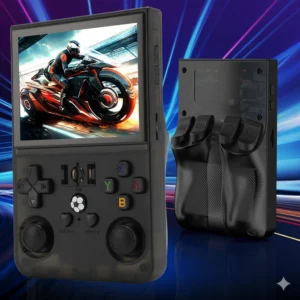
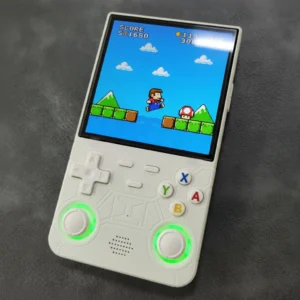
Screen size is not what separates these two. The difference that changes what you can play is the processor. The R36 Ultra’s hands-on figures read RK3326 with a Mali-G31 MP2 GPU and 1GB of RAM, the same platform as the R36S, R36 Max and R40S Pro. The R36 Pro’s listing names the RK3566 with 1GB of RAM, a newer Rockchip chip class.
That matters because a bigger panel never raises the emulation ceiling; a different chip does. On RK3326 hardware, PS1 is the comfortable ceiling, while N64 and PSP results vary a lot from game to game. The R36 Pro’s listing positions it for N64 and PSP-class systems on top of the classic library. Treat that as a seller claim with per-game results varying, but it is the only one of the two on a step-up chip.
| Spec | R36 Pro | R36 Ultra |
|---|---|---|
| Screen | IPS; 4.0-inch on our product page, 3.5-inch in the linked Amazon listing title | 4.0-inch IPS |
| Resolution / shape | 640×480 (4:3) | 720×720 (1:1 square), hands-on spec sheet |
| Chip | Rockchip RK3566 | Rockchip RK3326, Mali-G31 MP2 (hands-on figures) |
| RAM | 1GB | 1GB DDR3 (hands-on figures) |
| Joysticks | Hall-effect | Dual analog |
| Battery | 4000mAh (listed) | 3000mAh listed; 3500mAh hands-on estimate |
| Storage | microSD; 64GB or 128GB options, up to 256GB | microSD; 64GB or 128GB options |
| Charging | USB-C | USB-C |
| Headphone jack | 3.5mm | — |
| Colours | Red, white, black, blue, grey | Black, white, blue, purple |
| In the box | Console, USB-C cable, pre-applied screen protector | — |
R36 Pro vs R36 Ultra: specs as listed. A dash means the figure is not published for that device.
Screen: 4:3 at 640×480 vs square 720×720
The panels differ in shape. Our R36 Pro product page lists a 4.0-inch IPS screen at 640×480, but the Amazon listing we link titles it 3.5-inch, so confirm the size on the listing you buy from. Either way it is a 4:3 shape that matches most classic consoles, so NES, SNES, Genesis and PS1 games can fill the panel. The R36 Ultra’s 4.0-inch panel is a 720×720 square. It has more pixels, but 4:3 games sit with bars above and below, and wide Game Boy Advance games use even less of the height.
If you mostly play 4:3 systems, the Pro’s shape is the better fit. If you like the Ultra’s sharper square panel and play a lot of Game Boy and Game Boy Color, which are close to square, the Ultra’s screen suits that library well. Our R36 Ultra specifications page covers the rest of its sheet.
Controls, battery and storage
Sticks. The R36 Pro lists hall-effect joysticks, which use magnets instead of wearing contacts and are designed to resist stick drift. The R36 Ultra lists dual analog sticks without that claim. That matters most in analog-heavy N64 and PSP games.
Battery. The R36 Pro lists a 4000mAh cell. R36 Ultra sources disagree: the retail listing says 3000mAh and a hands-on estimate says 3500mAh. Either way the Pro has the larger stated battery; run time is a seller claim on both. Our battery guide has practical tips.
Storage. Both use removable microSD cards. The R36 Ultra is sold in 64GB and 128GB options; R36 Pro listings show 64GB and 128GB options and support cards up to 256GB.
Which should you choose?
Choose the R36 Pro if you want more than RK3326 can deliver, you plan to try N64 or PSP-class games, you want hall-effect sticks, or you mainly play 4:3 systems and want them to fill the screen.
Choose the R36 Ultra if your library is mostly NES, SNES, Genesis, the Game Boy family and PS1, you like its sharp square panel, and you want the model with the most setup, firmware and troubleshooting guides on this site. Start with the R36 Ultra emulation guide to see what it handles well.
Neither listing guarantees built-in WiFi or Bluetooth, so do not choose either one for wireless features. Weighing the Ultra against a refreshed shell instead? See R36 Ultra X vs R36 Ultra, or the R36 Ultra vs R36S vs R36 Max comparison for the rest of the family.
Looking at the R36H instead? Our sister site compares it in R36H vs R36 Ultra.
Frequently asked questions
Is the R36 Pro faster than the R36 Ultra?
On paper, yes. The R36 Pro uses a Rockchip RK3566, while the R36 Ultra uses the RK3326 found across most of the R36 family. That gives the Pro more headroom for N64 and PSP-class games, though results still vary by game.
Is the R36PRO the same as the R36 Pro?
Yes. Listings write the name both ways, as R36PRO and R36 Pro. Check the listing for the RK3566 chip, 640×480 screen and 4000mAh battery to be sure it is the same model.
Which has the bigger battery?
The R36 Pro, with a listed 4000mAh cell. R36 Ultra sources quote 3000mAh (retail listing) or 3500mAh (hands-on estimate).
Do the R36 Pro and R36 Ultra have WiFi?
Neither listing we track guarantees built-in WiFi or Bluetooth. If wireless features matter, confirm them on the exact listing before you order.
Our pick: the R36 Ultra
Check Price on Amazon →Opens in a new tab · As an Amazon Associate we earn from qualifying purchasesNew handhelds, tested first
Occasional emails when a model is worth your money. No spam.