
The J36 Ultra is not an R36S, and it is not an R36 Ultra. It’s a separate model name used by several sellers, and its “Ultra” has nothing to do with the R36 Ultra. For most buyers the R36S is the safer choice, because its chip is known and its software is well documented. If you want a bigger screen and Wi-Fi, the R36 Ultra is the upgrade within the same family.
So is the J36 Ultra a clone or an upgrade? Neither, exactly. It’s a different, less-documented device whose specs shift from one listing to the next. Below we compare what can actually be checked: screen, Wi-Fi, system type, battery claims and firmware support. Anything we couldn’t confirm is marked as unknown.
As an Amazon Associate we earn from qualifying purchases.
Quick picks
- Best for most buyers: R36S. For first-time buyers, gift shoppers and tinkerers. It's the well-documented baseline the J36 Ultra gets compared against: a 3.5-inch IPS screen, a named RK3326 chip, 64GB or 128GB of storage and a large custom-firmware community (ArkOS, dArkOS, muOS, ROCKNIX).
- The real upgrade: R36 Ultra. For anyone drawn to the J36 Ultra for Wi-Fi or who wants a bigger screen. It has a 4.0-inch IPS screen and Wi-Fi, the same RK3326-class performance as the R36S, and our own R36 Ultra setup, firmware and troubleshooting guides.

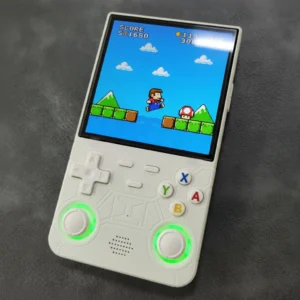
Quick answer: J36 Ultra vs R36S vs R36 Ultra
- The J36 Ultra isn’t an R36 model. It shares the “36” and the “Ultra”, but there is no verified link to the R36S or the R36 Ultra.
- Pick the R36S if you want the best-documented budget handheld, with community firmware and step-by-step guides for setup and fixes.
- Pick the R36 Ultra if you want a bigger 4.0-inch screen and Wi-Fi without leaving the R36 family.
- Pick the J36 Ultra only if you’ve checked the exact listing (system, battery, storage) and specifically want an Android or Wi-Fi gadget in a 3.5-inch body. Expect little community support.
New to these names? Our explainer on what an R36 handheld is sorts out the R36S, R36 Ultra, R36 Max and the many look-alikes.
| Feature | J36 Ultra | R36S | R36 Ultra |
|---|---|---|---|
| Screen | 3.5-inch, IPS on some listings; 640×480 where stated | 3.5-inch IPS | 4.0-inch IPS |
| Chip | Not disclosed | RK3326 | RK3326-class |
| System | Android-based on some listings; others don't say | Linux | Linux |
| Built-in Wi-Fi | Advertised on most listings | No | Yes |
| Battery | 2000–3000mAh claimed, varies by listing | — | — |
| Storage | 64GB or 128GB, depending on the listing | 64GB or 128GB | 64GB or 128GB |
| Community firmware | None verified | ArkOS, dArkOS, muOS, ROCKNIX and others | — |
J36 Ultra vs R36S vs R36 Ultra: what can be checked (the J36 Ultra column reflects listing claims, which vary by seller)
What is the J36 Ultra? One name, several devices
“J36 Ultra” is a listing name, not a single documented product. Several sellers and brands use it. One retailer sells a “Tegnamax J36 Ultra”, and an Indian-market version is sold as the Playtastic J36 Ultra. Their descriptions only partly overlap.
Where listings agree
- Screen: 3.5 inches. Listings that give a resolution say 640×480, and several say the panel is IPS.
- Wi-Fi: most listings we found advertise Wi-Fi or online play. A user manual for a 128GB version describes 5G Wi-Fi and more than 20 emulators.
Where listings disagree
- System: some sellers describe it as Android-based. Others don’t say.
- Battery: one wholesale listing claims 2000mAh. Others claim 3000mAh.
- Storage: 64GB or 128GB, depending on the listing. At least one US listing ships it on a 64GB TF (microSD) card.
- Chip: none of the listings we found names the processor. One supplier overview claims “older 32-bit hardware”, which is hard to square with the listings that describe Android and Wi-Fi.
The upshot: a generic J36 Ultra spec sheet tells you very little. What arrives depends on the seller, so judge the specific listing in front of you, not a summary you found elsewhere.
Side-by-side: J36 Ultra vs R36S vs R36 Ultra
The comparison table sticks to what can be checked. Where a value isn’t published or we couldn’t confirm it, the cell says “not disclosed” or shows “—”. The J36 Ultra column shows what the listings we found claim, not one verified unit.
Two differences matter most:
- The chip. The R36S and R36 Ultra have a known RK3326-class processor. The J36 Ultra’s processor isn’t published.
- The battery. The J36 Ultra’s battery figure is the least reliable number here. Listings for the same name disagree by 1,000mAh.
One more naming trap: model names get reused. At least one shop lists an “R36 Ultra” as a 5-inch horizontal device. The R36 Ultra in this guide is the 4.0-inch IPS model. Our R36 Ultra specifications page has its screen, battery, Bluetooth and Wi-Fi details.
Screen and size: the J36 Ultra and R36S are the same class
On screen, the J36 Ultra and the R36S are in the same class. Both use a 3.5-inch panel, and J36 Ultra listings that state a resolution give 640×480. If you’re choosing between those two, the screen won’t decide it.
The size upgrade in this comparison is the R36 Ultra and its 4.0-inch IPS screen. If a bigger display is what you’re after, that’s the model to look at.
You may come across a comparison article that describes the J36 Ultra as having a “standard LCD” and internal storage only. The J36 Ultra listings we found advertise an IPS screen and storage on a TF card (a 64GB card in one US listing). So don’t rule the J36 Ultra out on that basis. Just don’t assume every unit matches the better listings either.
Wi-Fi and Android: the J36 Ultra's real selling point
Wi-Fi is why most people notice the J36 Ultra. Its listings push Wi-Fi online play, and at least one retailer advertises YouTube streaming. Some sellers describe the system as Android-based.
That is a genuine difference from the R36S, which has no built-in Wi-Fi. But an Android-based handheld is a different kind of device from the R36S and its Linux game menu:
- What you may gain: apps and video streaming, if your unit really runs Android.
- What you give up: R36S setup guides, firmware images and troubleshooting advice don’t apply to an Android device. You’d be relying on the seller for help.
If you want Wi-Fi on a documented device, the in-family answer is the R36 Ultra. Our Wi-Fi setup and PortMaster guide explains what Wi-Fi is actually used for on it, and the specs page covers its Wi-Fi and Bluetooth. For a wider look at connected handhelds, see our WiFi retro handheld console overview.
Game performance: what we can and can't say
The R36S and R36 Ultra are both RK3326-class, so they play the same systems at about the same speed. Between those two, you’re choosing a screen and features, not performance.
The J36 Ultra is harder to call. Its processor isn’t published, and the only hardware claim we found, one supplier’s “older 32-bit” description, conflicts with the Android listings. So we can’t honestly say whether it plays your games as well as an R36S, better or worse. If one system matters to you, such as disc-era PlayStation games, ask the seller which chip the unit uses before you buy.
Ignore the preloaded-game counts in listings. They say nothing about how smoothly anything runs, and the numbers aren’t even consistent within a single listing. Preloaded libraries are also a legal grey area. You can add your own game files instead, as our guide on how to add games legally explains.
For realistic, system-by-system expectations on RK3326 hardware, read our R36 Ultra emulation guide. It applies to the R36S too.
J36 Ultra firmware: updates, ArkOS and what not to do
Firmware is where these devices differ most, and it’s the question other comparisons skip.
R36S: plenty of options
The R36S has a well-documented custom-firmware scene, including ArkOS, dArkOS, muOS and ROCKNIX. Our R36S custom firmware guide shows how to flash ArkOS and DarkOS with Win32 Disk Imager. The DarkOS guide explains what it changes and whether it’s worth switching.
J36 Ultra: no verified support
We found no verified custom firmware for the J36 Ultra and no documented official update source. If you already own one:
- Don’t flash R36S images onto it. They’re made for the R36S’s RK3326 hardware. There’s no evidence they work on a device whose chip isn’t published, and flashing one overwrites the system your unit shipped with.
- Back up first. Before changing anything, copy the stock SD card, or note what’s on internal storage if your unit uses it. Our SD card guide walks through the backup.
- Ask the seller about updates. If an official update exists, it will come from the seller or the maker, not the R36 community.
If tinkering with firmware is part of the fun for you, that alone is a reason to choose the R36S.
J36 Ultra vs R36 Ultra: is the R36 Ultra the real upgrade?
As far as anyone has verified, the two share the word “Ultra” and nothing else. Here’s how they line up:
- Screen: the R36 Ultra has a 4.0-inch IPS screen. J36 Ultra listings show 3.5 inches.
- Wi-Fi: both advertise it. The R36 Ultra’s Wi-Fi is documented on our specs page and in our Wi-Fi guide.
- Hardware: the R36 Ultra is RK3326-class. The J36 Ultra’s chip isn’t disclosed.
- Support: the R36 Ultra is covered by R36-family guides, including our setup guide, troubleshooting guide and firmware guide. The J36 Ultra has little community support.
- Where the J36 Ultra might win: a more pocketable 3.5-inch body and, on some listings, Android.
One hands-on reviewer who compared the R36 variants preferred the R36 Ultra for its screen, buttons, Wi-Fi and RGB rings. For most people searching “J36 Ultra vs R36 Ultra”, the R36 Ultra is the upgrade they hoped the J36 would be. Still unsure? Read whether the R36 Ultra is worth it. If you’ve ruled out the J36 and just need to choose between R36 models, see our R36 Ultra vs R36S breakdown.
Which should you buy?
A gift or a child’s first handheld
Go with the R36S or the R36 Ultra. If something goes wrong on day one, setup help and troubleshooting guides exist for both. With a J36 Ultra, you’d be relying on whoever sold it. Our pages on a handheld game console for kids and a gift for a retro gamer cover what else to think about.
Tinkerers
Choose the R36S. It has a named chip, several custom firmwares and a community that has documented almost everything.
Wi-Fi or a bigger screen
Choose the R36 Ultra. You get a 4.0-inch IPS screen and Wi-Fi, the same RK3326-class performance as the R36S, and its own setup and troubleshooting guides.
Curious about the J36 Ultra, or already own one
Only buy one after running the checklist below on the exact listing. If you already own one, enjoy it as it is: keep a backup of its storage and ask the seller about updates rather than flashing R36S firmware. Want more options in the same tier? See our best budget retro handhelds ranking.
Before you buy: a 5-point listing check
These checks work for any J36 or R36 listing:
- Is the chip named? A named processor (the R36S and R36 Ultra are RK3326-class) lets you look up what it can run. No chip means no way to judge performance.
- Is the system named? Android and Linux are very different experiences, and only Linux-based R36 units can use R36 community firmware and guides.
- Do the numbers match? Compare the screen resolution and battery mAh across the title, bullet points and images. J36 Ultra listings already disagree on battery (2000 vs 3000mAh), so a mismatch inside one listing is a warning sign.
- Is the SD card a brand-name card? Stock cards in budget handhelds are described as prone to failure. Back yours up as soon as it arrives, and consider moving to a brand-name card such as a SanDisk 128GB microSD card.
- What is the return policy? A clear return window protects you if the unit isn’t what the listing promised. Our guide to spotting a fake R36S and our where to buy page cover seller checks in more detail. Once a unit arrives, the quality check guide helps you catch problems while you can still return it.
 SanDisk 128GB MicroSD CardCheck Price →
Frequently asked questions
Is the J36 Ultra a clone of the R36S?
Not in the sense of being an R36S variant. It’s a different model name sold by several sellers, in the same 3.5-inch, 640×480 class. You could call it a budget look-alike, but there’s no evidence its internals match the R36S, and its chip isn’t published.
Is the J36 Ultra the same as the R36 Ultra?
No. The R36 Ultra is part of the R36 family and has a 4.0-inch IPS screen, while J36 Ultra listings show a 3.5-inch screen. See our R36 Ultra specs for full details.
Which is better, the J36 Ultra or the R36S?
For most people, the R36S, because its hardware is known and its software support is far better. The J36 Ultra’s advantage is Wi-Fi, plus Android on some units. We found no verified data showing it plays games better.
Does the J36 Ultra have Wi-Fi?
The listings we found advertise Wi-Fi or online play, and some advertise video streaming. The R36S has no built-in Wi-Fi, but the R36 Ultra does. Our Wi-Fi guide explains how it’s used.
Can I install ArkOS or dArkOS on the J36 Ultra?
We found no verified support, so don’t flash R36S images onto it, and back up its storage before changing anything. If custom firmware matters to you, buy an R36S and follow our custom firmware guide.
Why do J36 Ultra specs differ between listings?
Several sellers and factories use the same name, so battery (2000 vs 3000mAh), system and storage (64GB vs 128GB) vary. Always check the exact listing rather than a generic spec sheet.
Our pick: the R36 Ultra
Check Price on Amazon →Opens in a new tab · As an Amazon Associate we earn from qualifying purchasesNew handhelds, tested first
Occasional emails when a model is worth your money. No spam.